
AC Infinity Controllers: Controller AI+ or 69 PRO? Comparison and Modes
The controller is the heart of every AC Infinity setup. It determines whether the extract fan simply runs at a fixed speed or the entire tent takes care of temperature, humidity and VPD by itself. In this article, we compare the Controller AI+, the Controller 69 PRO included with the CLOUDLINE T and a standard speed controller. We explain the modes, show when each controller is sufficient and advise what to connect to it.
Which AC Infinity controllers are sold in the EU
The manufacturer’s current European website and Higarden list the Controller AI+ as a standalone central controller. The other smart controller, the Controller 69 PRO, is included with the CLOUDLINE T4, T6 and T8 inline fans (the manufacturer labels them CLOUDLINE PRO T in the EU). CLOUDLINE A and S fans come with only a basic speed controller.
The manufacturer’s US website also offers the Controller 69 PRO+ and CLOUDCOM 6. The range varies by market; here, we focus on the AI+ and the 69 PRO included with European CLOUDLINE T packages.
Comparison: AI+, 69 PRO and speed controller
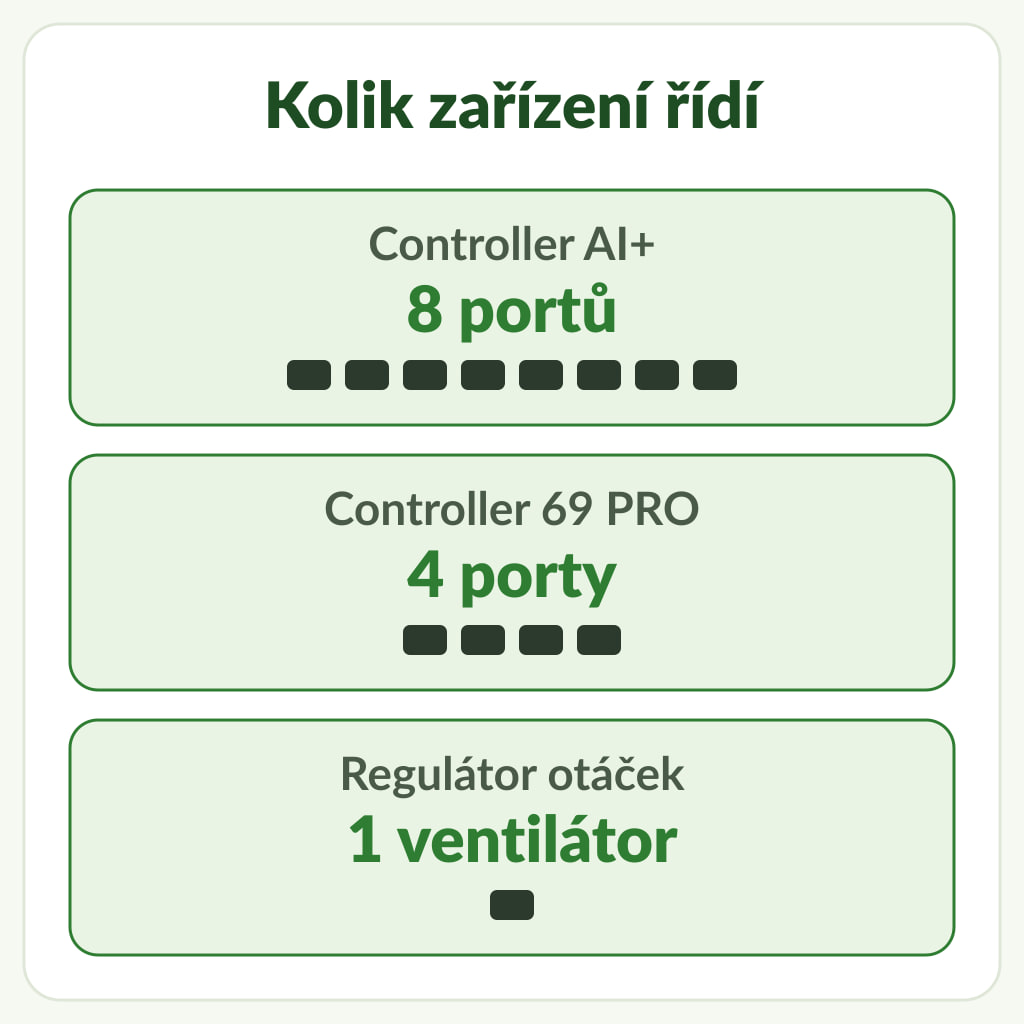
The main difference is the number of ports, which determines how many devices the controller can control:
Both smart controllers measure temperature and humidity, calculate VPD and control compatible devices at 10 power levels (1–10), plus off (0). The table provides more details.
| Parameter | Controller AI+ | Controller 69 PRO | Speed controller |
|---|---|---|---|
| How you get it | on its own or in AI+ PRO kits | included with CLOUDLINE T4, T6 and T8 | included with CLOUDLINE A and S |
| UIS ports | 8 (up to 32 devices with splitters) | 4 | – (1 fan) |
| Measurement | built-in sensor and wired probe, 2 zones (inside and outside the tent) | wired temperature and humidity probe | measures nothing |
| VPD mode | yes | yes | no |
| AI mode | yes (for beginners and experienced users) | no | no |
| Run time at minimum and maximum | yes | no (minimum and maximum level only) | no |
| Additional sensors | optional CO2/light, soil or hydro sensor; the manufacturer lists 3 sensors in total, including the built-in one | no | no |
| App | Wi-Fi and Bluetooth | Wi-Fi or Bluetooth | no |
| Power supply | own mains adapter | from the connected UIS device | from the fan |
Controller modes explained simply
AI+ and 69 PRO offer the same set of basic modes. You can set each port separately, so the extract fan can run according to temperature while the light follows a schedule.
- OFF and ON: switch off or run continuously at the selected level (0–10). On the 69 PRO, the values set in OFF and ON also serve as the minimum and maximum for other modes; to switch the device off completely when a programme is inactive, set the minimum to 0.
- AUTO: the device responds to a set upper or lower temperature or humidity limit and operates between the selected minimum and maximum. A typical example is an extract fan that speeds up when the air beneath a grow light above tomato plants starts to warm up.
- VPD: the controller operates according to vapour pressure deficit, based on a combination of temperature and humidity. This mode is useful for a humidifier and dehumidifier. The article VPD and transpiration explains what VPD means and which values are used.
- TIMER TO ON / TIMER TO OFF: the device switches on or off after the set time has elapsed.
- CYCLE: the device repeatedly switches on and off, for example, a clip fan above chilli plants.
- SCHEDULE: a daily on/off schedule, typically for a light.
Both controllers let you set minimum and maximum power levels. This allows the extract fan to run continuously at least at the set minimum. AI+ also lets you set how long it runs at minimum or maximum. According to the manufacturer, AI mode analyses previous results to limit power overshoot or undershoot.
When is CLOUDLINE T enough, and when is AI+ worth it?
The following options are our recommendations based on the number of devices and the features you need.
CLOUDLINE T with the 69 PRO controller is enough if:
- you have one tent and mainly want automatic extraction based on temperature, humidity or VPD,
- the other 3 ports are enough for connecting, for example, a CLOUDRAY S6 clip fan, an IONFRAME EVO light and a CLOUDFORGE T3 humidifier,
- you do not need a CO2 sensor or substrate humidity measurement.
Controller AI+ is worth it if:
- you want to control several devices at once, such as an extract fan, two circulating fans, a light, a humidifier, a dehumidifier and heaters,
- your setup includes a HYDRONE 5 or THERMOFORGE S7, which do not automatically maintain the target climate without a controller (the manufacturer gives AI+ as an example for HYDRONE; THERMOFORGE S7 can also be automated using the 69 PRO),
- you want to monitor the climate both inside the tent and in the room (2 zones),
- you want to use the CO2 and light sensor or the soil sensor, which work only with AI+.
Our recommendation for a new extraction setup with AI+ is the Air Filter Set AI+ PRO 150 mm. It includes a CLOUDLINE PRO S6 fan, Controller AI+, a 150 mm carbon filter and ducting approximately 7.6 m long (25 ft = 7.62 m). The range also includes 100 mm and 200 mm sizes. For the 200 mm AC-FKT8, the manufacturer lists AI+, but the description on Higarden lists the 69 PRO. Please check the contents of the specific package before ordering. We discuss how to choose the right extraction fan size in the article CLOUDLINE A, S or T?
Expansion: splitters, wireless transmission and cables
- UIS Splitter Hub 4-Port splits one port between up to 4 identical devices sharing the same programme. Hubs can be daisy-chained up to three levels; connected devices must be the same type, and the hub is not compatible with Type-A and Type-B Lighting Adapters. It is useful, for example, for running two clip fans on one programme.
- UIS wireless transmitter and receiver (2 pairs per pack) replaces the cable between the controller and the device. It operates at 2.4 GHz with fixed pairing and works without an internet connection. According to the manufacturer, the range is up to approximately 8 m with one transmitter, 5 m with two and 3 m with three to eight; obstacles can affect the connection.
- Cables: for AI+, choose cables designed for AI+, such as the UIS controller-to-device cable 3.05 m, which works with both AI+ and 69 PRO. The AC-EXR9 cable designed for the Controller 69 also works with AI+, but according to the manufacturer, it does not support some device recognition features and advanced functions. For an extension, use the female-to-male cable, approximately 3 m.
- Replacement probes: climate probe for AI+ (7.3 m) and probe for 69 PRO (6.1 m; 20 ft).
- Lights from other brands can be connected using a UIS Lighting Adapter: Type-A, Type-B or Type-D. Compatibility must be checked for the specific light model. The Lighting Adapter does not power the controller: the 69 PRO needs another UIS device to supply power, while AI+ has its own mains adapter.
App and connection
- The controllers connect to Wi-Fi only on the 2.4 GHz band; they do not support 5 GHz networks.
- For AI+, the manufacturer states that programmes remain stored in the controller and continue to run even without a Wi-Fi connection.
- The app displays temperature and humidity graphs covering periods from one hour to one year, supports CSV export and sends notifications.
- The controller firmware is updated through the app. According to the manufacturer, an update may be needed, for example, when connecting a light from another brand through a Lighting Adapter.
Frequently asked questions
Does the Controller 69 PRO work without a fan?
Yes, if it is powered by another compatible UIS device, such as a CLOUDRAY or humidifier. The 69 PRO does not work without a power source; in the CLOUDLINE T package, it is powered by the fan and does not come with its own mains adapter. The Lighting Adapter does not power it.
How many devices can I connect to the Controller AI+?
8 directly, each on its own port with its own programme. With splitters, you can connect up to 32 devices, but devices on the same port share the same programme.
Do AI sensors (CO2, soil) work with the 69 PRO?
The manufacturer specifies these two particular sensors exclusively for the Controller AI+; they cannot be used with the 69 PRO.
Can I connect a CLOUDLINE T fan to AI+ later?
Yes. The CLOUDLINE T fan has the same UIS connector and can be connected to AI+ using the UIS cable included in the package. You can then continue to use the Controller 69 PRO with another UIS device that powers it.
Does the HYDRONE 7 or THERMOFORGE T7 need a controller?
No. Both have their own sensor-based control. A controller adds shared programmes with other devices and app access. HYDRONE 5 and THERMOFORGE S7 need a compatible controller for automatic regulation; they can also operate independently at a manually set power level.
Where to browse
You can find all controllers, sensors and UIS accessories in the AC Infinity Controllers and Sensors category. CLOUDLINE T fans with the Controller 69 PRO are in the AC Infinity Fans category, while AI+ kits are in the Ventilation Sets category. The guide AC Infinity: what works with what and why explains how lighting and climate fit into a setup. Find complete setups for different tent sizes in the article AC Infinity setups by tent size.