
AC Infinity: A Guide to Smart Grow Tents – What Works with What, and Why
AC Infinity builds indoor growing equipment as one interconnected system: the controller, fans, lights, humidifier, dehumidifier and heater all speak the same “language”: UIS. In this guide, you’ll find out what works with what, which devices need a controller and which can operate on their own. At the end, you’ll find an overview of setups by tent size and links to more detailed guides.
What are AC Infinity and the UIS system?
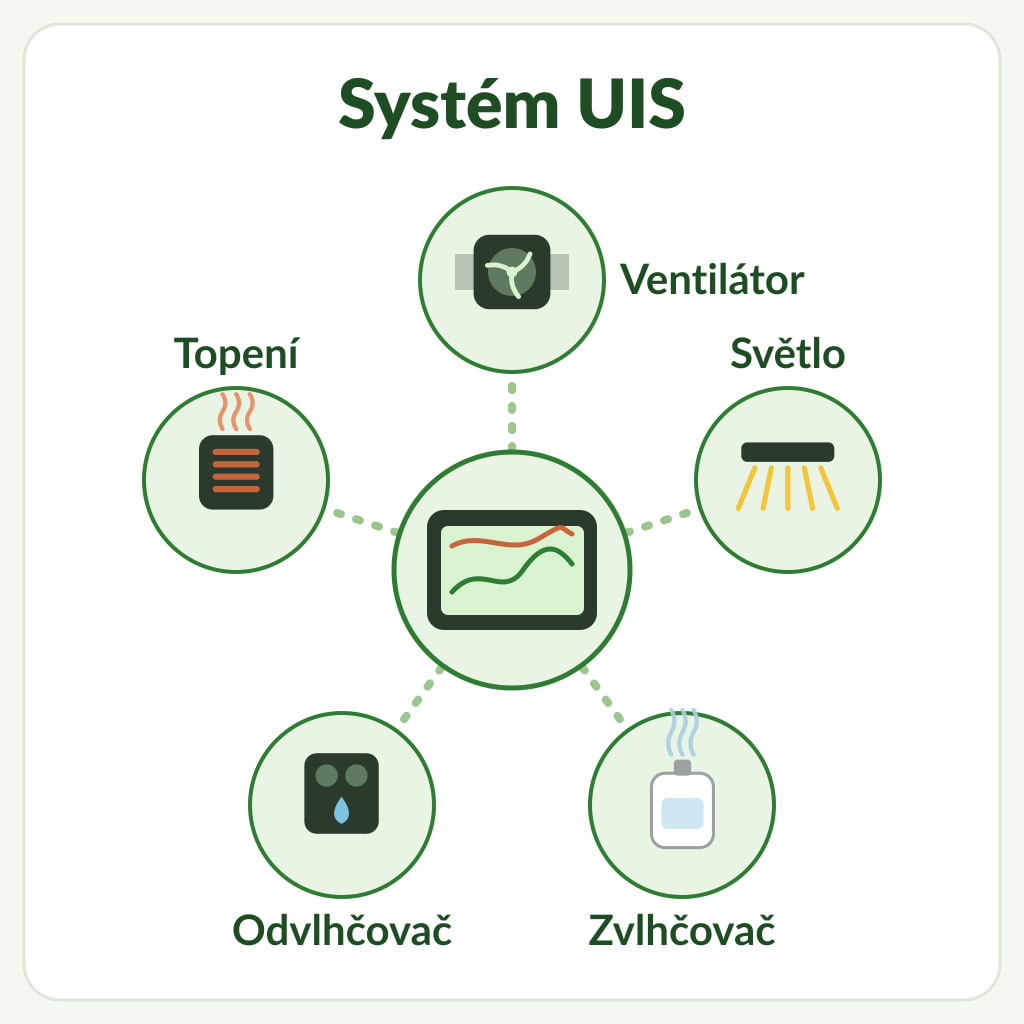
AC Infinity is an American manufacturer (AC Infinity Inc., California). The European online shop acinfinity.eu is operated by the German company GrowTechnology GmbH. The range is built around the UIS (Universal Infinity System) platform, launched by the manufacturer in 2020.
UIS platform devices use a shared control protocol and a proprietary variant of the USB-C connector. The controller operates compatible devices using a PWM signal across 10 power levels (1–10), plus off (0). The following devices connect to the controller ports:
The benefit is simple: instead of several thermostats and timers, you have one controller with a probe that monitors temperature, humidity and VPD, then operates connected compatible equipment according to the selected programmes.
Three levels of control
You can control AC Infinity equipment in three ways. They differ in price and in how much the setup can do automatically.
- Speed controller is included with CLOUDLINE A and CLOUDLINE S fans (the manufacturer labels this range CLOUDLINE PRO S in the EU). Set the speed manually across 10 levels. It does not measure or control anything automatically.
- Controller 69 PRO is included with CLOUDLINE T4, T6 and T8 fans (called CLOUDLINE PRO T by the manufacturer). It has a temperature and humidity probe, 4 ports for UIS devices and an app connection via Wi-Fi or Bluetooth.
- Controller AI+ is a standalone controller with 8 ports (for up to 32 devices with splitters), two measurement zones (inside and outside the tent), a display, capacitive touch buttons and an AI mode. Of the AI+ and 69 PRO controllers compared, only the AI+ supports CO2 and substrate moisture expansion sensors.
For a detailed comparison, operating modes and setup tips, see the article AC Infinity controllers: Controller AI+ or 69 PRO?
Compatibility matrix: what works with what
The table summarises the devices available from us and how they work with and without a controller. It is based on the manufacturer’s compatibility table and technical data sheets.
| Device | Controller AI+ | Controller 69 PRO (in CLOUDLINE T) | Without a UIS controller |
|---|---|---|---|
| CLOUDLINE A4, A6 and S4–S12 | yes, UIS cable included | yes | manually via the included speed controller (10 levels) |
| CLOUDLINE T4, T6, T8 | yes | yes, controller included | 69 PRO is included; the fan can also be connected to another compatible controller |
| CLOUDRAY A6, A9, S6, S9 | yes | yes | yes, 10 speeds on the fan |
| IONFRAME EVO; IONBEAM S11, S16, U2, U4 | yes (brightness and timed programmes) | yes | yes, digital timer included |
| CLOUDFORGE T3, T5, T7 | yes | yes | yes, built-in humidity control |
| HYDRONE 5 | yes, the manufacturer recommends VPD mode | not verified for 69 PRO – check the specific combination before buying | fixed setting only, non-adjustable |
| HYDRONE 7 | yes, the manufacturer recommends VPD mode | not verified for 69 PRO – check the specific combination before buying | yes, built-in humidity and VPD control |
| THERMOFORGE S7 | yes | yes | 10 manual levels only, no thermostat |
| THERMOFORGE T7 | yes | yes | yes, built-in temperature and VPD control |
| Lights from other brands | via a suitable UIS Lighting Adapter; check the specific light model | via a suitable UIS Lighting Adapter; check the specific light model | depending on the light’s own controls |
| CO2 + light sensor, soil sensor | yes, AI+ only | no | no |
In its compatibility table, the manufacturer notes that an adapter may be required for the CLOUDLINE range. However, current European CLOUDLINE A, S and T models include a UIS cable (male-to-male, 3.05 m) and connect directly to the controller. The Molex-to-UIS adapter is intended for compatible older EC fans with a Molex connector; the note in the table does not mean that every CLOUDLINE needs one.
What can operate on its own and what needs a controller?
Most of the equipment listed here also works without a central controller; control options vary by model. The following two devices do not automatically maintain a target temperature, humidity or VPD without a controller:
- HYDRONE 5 (for supplementary humidity adjustment in a tent up to 1 × 1 m when the room climate is already controlled) runs only at a fixed setting without a controller. For humidity- or VPD-based control, it needs a compatible AC Infinity controller, such as the AI+. The controller is not included.
- THERMOFORGE S7 (1,000 W heater) has 10 manual heating levels and a fresh air mode. It cannot maintain a target temperature or VPD on its own; it needs a UIS controller for that.
HYDRONE 7 (built-in humidity and VPD control with a probe), THERMOFORGE T7 (built-in temperature and VPD control) and CLOUDFORGE T3, T5 and T7 humidifiers operate independently. If you connect them to a controller later, they gain shared programmes, charts and app access. The article VPD and transpiration explains why humidity and VPD matter.
Third-party devices in the AC Infinity system
You do not need to replace a light from another brand. Connect it to the AI+ or 69 PRO controller via a UIS Lighting Adapter, depending on the type of dimming:
- Type-A: lights with an RJ11/12 connector and PWM or 0–10 V dimming,
- Type-B: lights with an RJ11/12 connector and resistor-based dimming,
- Type-D: drivers with dimming wires (Dim +/–).
The Lighting Adapter does not power the controller. Controller 69 PRO therefore needs power from another connected UIS device, such as a fan; AI+ uses its own mains adapter. The manufacturer does not guarantee full compatibility with lights from other manufacturers, and the controller firmware may need to be updated in the app. The manufacturer publishes a list of tested lights on its website.
The GAS Cross-Connect adapter is used to connect a compatible G.A.S EC fan to an AC Infinity or Trolmaster controller. According to the product description, it also requires a Type-A adapter for AC Infinity and an EFC-1 adapter for Trolmaster. The Cross-Connect itself does not power the controller.
Accessories that expand the system
- UIS Splitter Hub 4-Port splits one controller port to connect up to 4 identical devices running the same programme, for example two clip fans. Hubs can be daisy-chained up to three levels; connected devices must be the same type, and the hub is not compatible with Type-A and Type-B Lighting Adapters.
- UIS wireless transmitter and receiver replaces the cable between the controller and a device. It operates at 2.4 GHz and works without internet access. The manufacturer states a range of up to approx. 8 m with one transmitter, 5 m with two and 3 m with three to eight; obstacles may reduce the range.
- Extension cables: for AI+, choose cables intended for AI+, such as the UIS controller-to-device cable, 3.05 m. The AC-EXR9 cable, intended for Controller 69, works with AI+, but according to the manufacturer it does not support some device recognition and extended features.
- Sensors for AI+ (not 69 PRO): the CO2 and light sensor and the soil sensor for substrate moisture. They do not work with Controller 69 PRO.
Ventilation: CLOUDLINE A, S or T?
All three CLOUDLINE inline fan ranges have a PWM-controlled EC motor and include a UIS cable. They differ in what else is in the box:
- CLOUDLINE A: more affordable range with a speed controller,
- CLOUDLINE S: higher maximum flow rate than A at the same diameter, a speed controller and 2 duct clamps,
- CLOUDLINE T: the same stated maximum flow rate as S at the same diameter, but includes a 69 PRO controller and probe that control the extract fan according to temperature, humidity and VPD.
The article CLOUDLINE A, S or T? How to set up tent extraction covers performance, choosing a diameter, and how to assemble a filter, ducting and silencer correctly. For general ventilation basics, see the guide How to choose and assemble tent ventilation.
Recommended setups by tent size
We have a basic and a smart option for each tent size. The basic setup is based on a CLOUDLINE T fan with its own sensor (or a CLOUDLINE A or S with a speed controller). The smart setup is based on a Controller AI+, to which you can gradually connect a light and climate equipment. For tents from 60 × 60 to 120 × 120 cm, we use the diameters found in the manufacturer’s European setups. For 150 × 150 cm, the 150–200 mm range is our indicative recommendation; the T8 and AI+ PRO 200 mm options listed here provide additional capacity. The final choice depends on the light’s heat output, room conditions and the resistance of the filter and ducting.
| Tent | Extract | Basic setup | Smart setup |
|---|---|---|---|
| 60 × 60 cm | 100 mm | CLOUDLINE T4 | Air Filter Set AI+ PRO 100 mm |
| 60 × 120 and 90 × 90 cm | 150 mm | CLOUDLINE T6 | Air Filter Set AI+ PRO 150 mm |
| 120 × 120 cm | 150 mm | CLOUDLINE T6 | Air Filter Set AI+ PRO 150 mm |
| 150 × 150 cm | 150–200 mm (our recommendation) | CLOUDLINE T8 | Air Filter Set AI+ PRO 200 mm (check the controller included) |
For the AC-FKT8 set (200 mm), the manufacturer’s European website lists AI+, while the current description on Higarden states 69 PRO. Before ordering, check which controller is included in the specific delivery; the AI+ is required for the AI+-controlled option.
For a complete list of components for each size (tent, filter, ducting, air circulation, lighting and climate), see the article AC Infinity setups by tent size.
Kits: everything in one box
If you do not want to choose the parts individually, take a look at an AC Infinity kit. It is a grow tent with equipment in one package. We offer kits for 60 × 60 × 180 cm, 60 × 120 × 180 cm, 90 × 90 × 180 cm and 120 × 120 × 200 cm tents. Check the exact contents of the specific delivery before ordering; descriptions and components may differ between generations of kits.
AC Infinity app
AI+ and 69 PRO controllers connect to the AC Infinity app (iOS and Android). In the app, you can set the same modes as on the controller, and also:
- view temperature and humidity charts covering periods from an hour to a year, and export data to CSV,
- receive alerts when readings fall outside the set range,
- use AI mode on the AI+ with presets based on the plant and equipment.
The controllers connect to Wi-Fi only on the 2.4 GHz band, not 5 GHz. For AI+, the manufacturer states that set programmes remain stored on the controller and continue running even without a Wi-Fi connection.
Why buy AC Infinity from us?
- Personal collection from our shop in Prague, where you can collect your order and discuss your setup with us.
- Czech customer support by phone and email if you need help choosing or connecting your equipment.
- Delivery of large kits: we can hand over oversised kits to you in person at the shop or send them by pallet transport.
- Items available to order: check availability and delivery time with our customer support team.
Frequently asked questions
Does Controller AI+ work with older AC Infinity fans?
Yes, with compatible models that have an EC motor and a UIS connector. The manufacturer offers a Molex-to-UIS adapter for compatible older EC fans with a Molex connector. For older models with a different motor or power supply, the adapter alone does not guarantee compatibility.
Can I connect a light from another brand to the controller?
Yes, with compatible lights, via a UIS Lighting Adapter Type-A, Type-B or Type-D, depending on the dimming method used by the specific model. Controller 69 PRO needs power from another UIS device, such as a fan; AI+ uses its own mains adapter.
Do I need another controller for CLOUDLINE T?
No. CLOUDLINE T4, T6 and T8 include Controller 69 PRO with a probe. You can connect, for example, a clip fan or an AC Infinity light to its other ports.
What extract fan should I use in a 120 × 120 cm tent?
In its European setup for this tent, the manufacturer uses a 150 mm CLOUDLINE PRO S6. For a separately assembled extract system, we recommend the CLOUDLINE T6 or Air Filter Set AI+ PRO 150 mm. For a higher heat load, you could consider a 200 mm CLOUDLINE T8 as extra capacity; the key factors are the required flow rate after accounting for the filter and ducting, as well as the temperature of the incoming air. Find the performance calculation in the article How powerful a fan do you need?
Does the controller work without Wi-Fi?
Yes. You can also operate the controller directly from its display, and AI+ continues running its set programmes without a Wi-Fi connection. The app is also used to set AI mode, advanced automations and firmware updates; it offers remote access, charts and alerts.
Where to find AC Infinity
You can find the full range on the AC Infinity brand page. Depending on what you are looking for, these categories may be useful: